Data Language Model (DLM)
The Data Language Model is Kaveon's deterministic semantic compilation and resolution layer. It indexes configured dataset metadata and values, builds eligible context artifacts, and resolves supported questions without a hosted model call. It complements—not replaces—the analytical Engine.
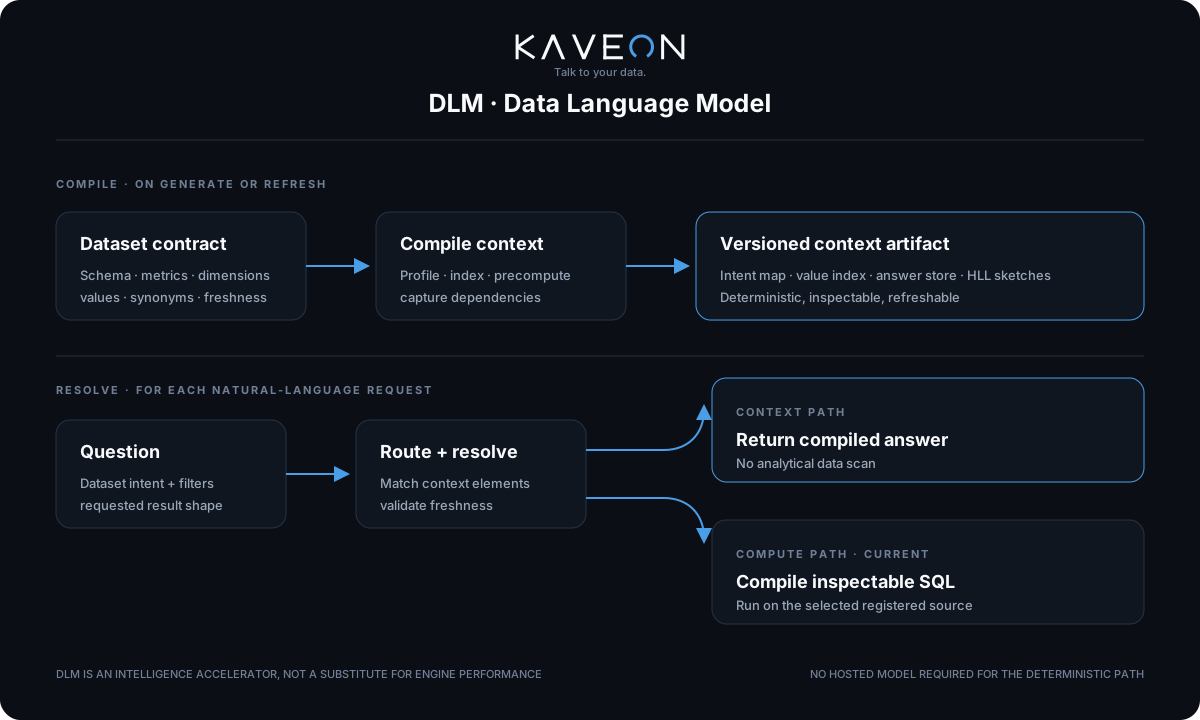
What is a DLM?
A DLM is a per-dataset compiled context artifact stored in KaveonDB’s durable product store. It is not a machine learning model — it is a deterministic index of your schema's metrics, dimensions, column values, and precomputed answers. When a user asks a question, the DLM resolves it to a specific metric, optional grouping dimension, and optional entity filters — then either serves the answer from precomputed context without a source query, or assembles a single live SQL query.
The compilation pipeline
Generating a DLM is a one-time encode step triggered via the dataset page or the API. It reads your warehouse's statistics and precomputes answers — it does not train a model. The pipeline has five stages:
1. Register
Define your dataset's fact table, metrics (with SQL expressions like SUM(revenue) or COUNT(DISTINCT user_id)), dimensions (grouping columns like country, platform), and optionally a date column for time-scoped queries. The registration also specifies which database connection to use.
2. Value indexing
The compiler queries SELECT DISTINCT for every dimension column and builds a value index — a lookup table mapping every real value (e.g. “United States”, “iOS”, “Enterprise”) to its column. This is what lets the DLM resolve entity filters from natural language: when a user says “in the US”, the value index matches “US” to the countrycolumn without any fuzzy model inference.
Value Index (excerpt):
  "United States"    → country
  "US"               → country  (alias)
  "iOS"              → platform
  "Enterprise"       → segment
  "Q4 2024"          → quarter
3. Synonym maps
A built-in synonym dictionary maps common terms to their canonical forms. For example, “actions” maps to “event”, “area” maps to “region”, “nation” maps to “country”. Users can also define custom aliases through the context editor (curation overrides).
Synonym Map (built-in):
  "country"  → ["nation", "state", "territory", "land"]
  "event"    → ["action", "activity", "occurrence", "log", "record", "entry"]
  "revenue"  → ["sales", "income", "earnings", "turnover"]
  "user"     → ["customer", "client", "account", "member", "subscriber"]
4. Precomputed answers
For every metric × dimension combination, the compiler runs the aggregation query once and stores the result in the dlm_answers table. This includes:
- Metric totals — the overall value for each metric (e.g. “Total Actions: 504,291,882”)
- Per-dimension breakdowns — the metric grouped by each dimension (e.g. Total Actions by country, by platform, by segment)
- Filtered slices — single-dimension-filter answers (e.g. Total Actions where country = ‘US’)
At runtime, these answers are loaded into the in-memory DLM context (_ANSWER_CACHE dict) and served without issuing another source query. End-to-end latency still includes API, context lookup, serialization, and network overhead.
5. HLL sketches
For non-additive metrics like COUNT(DISTINCT user_id), simple precomputed totals cannot be combined across dimensions (you can't sum distinct counts). The DLM uses HyperLogLog (HLL) sketches — probabilistic data structures that approximate distinct counts with ~2.3% error and can be merged across partitions. This means “how many active users in the US” can be answered from precomputed sketches without scanning the 504M-row fact table.
Metric: Active Users = COUNT(DISTINCT user_id)
  ├── HLL sketch (overall)        → ~12,847 users
  ├── HLL sketch (country=US)     → ~4,291 users
  ├── HLL sketch (platform=iOS)   → ~3,102 users
  └── HLL sketch (segment=Ent.)   → ~1,856 users

Merge: HLL(country=US) ∪ HLL(platform=iOS) → ~5,012 unique users
  (no full scan needed)
Multi-dataset routing
When a question arrives at POST /dlm/ask, the router scores it against every compiled DLM to find the best dataset. The scoring uses weighted lexical matching:
score = 3 × metric_hits      (metric names that appear in the question)
      + 2 × value_hits       (indexed values that appear in the question)
      + 4 × name_hits        (dataset name words that appear)
      + min(col_hits, 3)     (column names, capped at 3 to prevent generic matches)

Floor: score must be ≥ 2 to prevent stray single-word matches.
Tie-break: narrowest dataset (fewest columns) wins.
The routing is deterministic — the same question always routes to the same dataset. The routed dataset ID is returned in the response so the frontend can display it.
Question resolution
Once routed, the DLM resolves the question into structured components through a deterministic pipeline:
Metric matching
The question's tokens are matched against metric names and aliases. When no metric name explicitly matches, a smart fallback kicks in:
- Prefer
COUNT(*)orSUM()metrics overCOUNT(DISTINCT)for generic count questions - Avoid
AVGmetrics as defaults (averages need explicit intent) - Fall back to the first metric only as a last resort
COUNT(DISTINCT country) metric instead of SUM(actions). The DLM prefers additive metrics for generic “how many” questions.Entity filter resolution
The value index resolves entity references in the question to column filters. “in the US” becomes WHERE country = 'United States'. “on iOS” becomes WHERE platform = 'iOS'. Multiple filters can be resolved simultaneously.
Relative time parsing
The DLM recognizes temporal expressions and converts them to SQL date filters using the dataset's configured date column:
"last 7 days"       → WHERE event_date >= CURRENT_DATE - INTERVAL '7 days'
"last 3 months"     → WHERE event_date >= CURRENT_DATE - INTERVAL '3 months'
"this week"         → WHERE event_date >= CURRENT_DATE - INTERVAL '7 days'
"this month"        → WHERE event_date >= CURRENT_DATE - INTERVAL '1 month'
"this quarter"      → WHERE event_date >= CURRENT_DATE - INTERVAL '3 months'
"today"             → WHERE event_date >= CURRENT_DATE
"yesterday"         → WHERE event_date >= CURRENT_DATE - INTERVAL '1 day'
When a relative time filter is present, precomputed context is bypassed in favor of a live query — stale precomputed totals cannot answer “last 7 days” correctly.
Superlative and top-N detection
Questions with superlative patterns are automatically converted to ranked queries:
"which country has the most users"    → top_n=1, ORDER BY DESC
"top 5 platforms by revenue"          → top_n=5, ORDER BY DESC
"lowest 3 regions by error rate"      → top_n=3, ORDER BY ASC
"what has the least sessions"         → top_n=1, ORDER BY ASC
Superlative keywords (most, highest, largest, biggest, greatest) trigger descending sort. Bottom keywords (lowest, least, fewest, smallest, bottom) trigger ascending sort.
Year filter extraction
Standalone four-digit years in the question (2020–2039 range) are extracted as date filters: WHERE EXTRACT(YEAR FROM date_col) = 2024. This lets users say “revenue in 2024” without needing a full date range.
Answer serving
The DLM has two answer paths, and every response is honestly labelled so the user knows which path served them:
Context path — no source scan
When the question maps to a precomputed shape (metric total, per-dimension breakdown, or single-dimension filter), the answer is served from the in-memory DLM context (_ANSWER_CACHE dict) with no database query. The response is tagged ⚡ From context · no DB scan.
Precomputed shapes that serve from context:
  ├── "how many total actions"         → metric total
  ├── "actions by country"             → per-dimension breakdown
  ├── "actions in the US"              → filtered metric total
  ├── "top 5 countries by actions"     → sorted breakdown slice
  └── "which country has the most"     → top-1 from breakdown
Live query path — sub-second
Novel combinations (multi-filter, time-scoped, cross-dimension) assemble a single SQL query against the warehouse. The query is built deterministically from the resolved components — metric expression, group-by column, WHERE clauses, ORDER BY, LIMIT. The response is tagged Live query · Xs with the actual execution time.
Context hints
While a live query is running, the DLM serves context hints — the precomputed metric total and per-filter breakdowns — as a context preview. The user can see approximate data while the live query result replaces it when ready.
Dashboard integration
The DLM powers dashboard charts through a dedicated endpoint that serves aggregations from precomputed context:
serve-chart
POST /dlm/serve-chart takes a metric, optional group-by, and optional filters, and returns the result from DLM context. Eligible dashboard charts load from context instead of running live SQL against the warehouse. When context cannot answer (e.g. a novel filter combination), the response includes served: false and the frontend falls back to /sql/execute.
Dashboard curation
POST /dashboards/{dashboard_id}/dlm/curate precomputes the N-dimensional answer combinations for a dashboard's filter×chart definitions. After curation, even complex multi-filter dashboard interactions can serve from context when those combinations have been curated and remain valid.
Filter values
GET /dlm/filter-values returns distinct values for a dimension column from DLM context — no SQL query needed when the value index is present. Otherwise the request falls back to the selected source.
API reference
| Endpoint | Method | Purpose |
|---|---|---|
/dlm/ask | POST | NL→SQL: route question, resolve terms, return SQL + context answer |
/datasets/{id}/dlm/generate | POST | Compile the DLM artifact (idempotent unless force=true) |
/datasets/{id}/dlm | GET | Artifact status — manifest, rollups, generation time |
/datasets/{id}/dlm/context | GET | Context spec for the context editor |
/datasets/{id}/dlm/context | PUT | Save human curation overrides (aliases, breakdowns) |
/datasets/{id}/dlm/resolve | GET | Resolve a term to column + filter (retrieval probe) |
/datasets/{id}/dlm/refresh | POST | Incremental refresh — delta-merge for additive metrics |
/dlm/route | GET | Cross-dataset routing: score question against all DLMs |
/dlm/serve-chart | POST | Dashboard chart from precomputed context |
/dlm/filter-values | GET | Distinct dimension values from DLM context |
/dlm/coverage | GET | What context is compiled — datasets, date ranges, value coverage |
/dlm/cache/invalidate | POST | Clear in-memory DLM answer context (Admin only) |
/dlm/sweep | POST | Manual freshness sweep trigger (Admin only) |
/dlm/notify-data-change | POST | Pipeline webhook — invalidate + rebuild after ETL |
/dashboards/{id}/dlm/curate | POST | Precompute multi-filter dashboard combinations |
/datasets/{id}/freshness | GET | Freshness score + rebuild recommendation |