Kaveon Engine
A vectorized columnar query engine in Rust: its own SQL parser, planner, optimizer, catalog, and distributed runtime, reading Parquet and Delta directly over Arrow.
kaveon.product.* is a transactional catalog inside the Engine, anddatasets, charts and dashboards are rows in it. Authenticated principals, queued resource groups and partitioned aggregate and join spill are in. Statement clients still have no end-user authentication or TLS of their own, so the Engine stays behind a trusted boundary; S3, Iceberg, and sustained production-scale qualification remain open gates.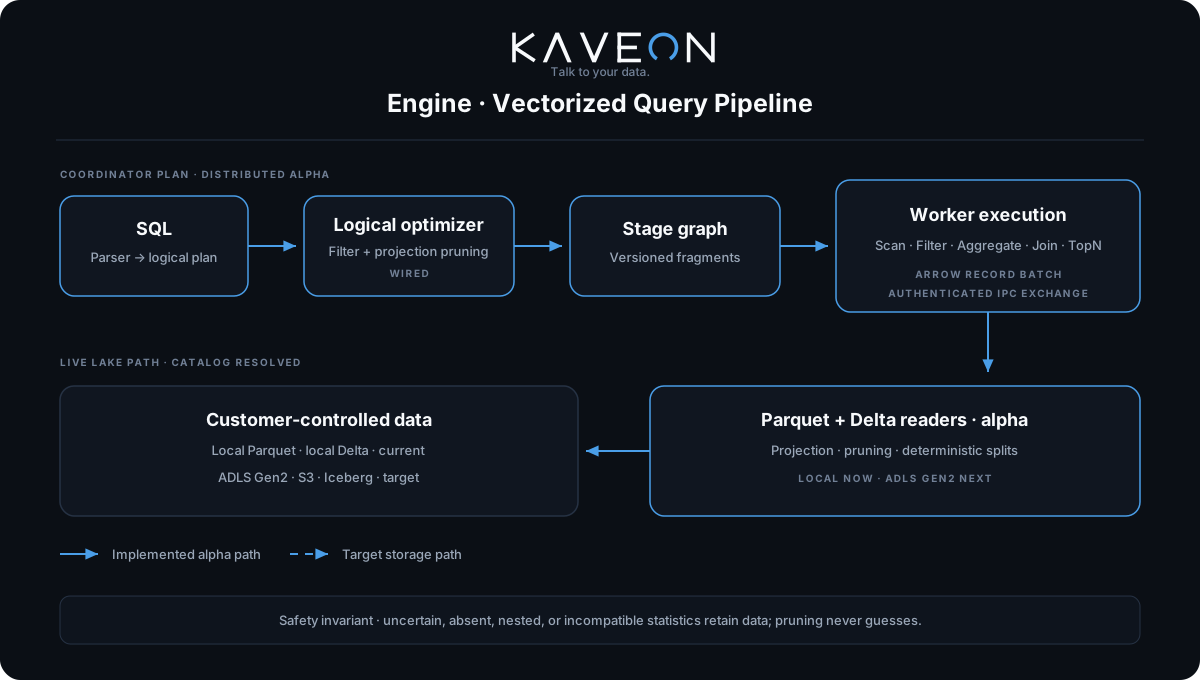
Why it exists
Most analytics products wrap an engine someone else wrote — DuckDB embedded, Trino deployed alongside, or SQL pushed down to whatever the customer already runs. Kaveon Engine is first-party so that execution, storage access, and the semantic layer can be designed against each other rather than negotiated across a boundary. It embeds no other engine.
Install
# Linux x64 / Apple Silicon macOS — engine-dev preview, installs to ~/.local/bin
curl -fsSL https://raw.githubusercontent.com/PruthviProdduturi/Kaveon/dev/scripts/install.sh | bash

# A tagged release (adds Intel macOS), verified against its SHA256SUMS
curl -fsSL https://raw.githubusercontent.com/PruthviProdduturi/Kaveon/dev/scripts/install.sh | KAVEON_VERSION=0.3.0 bash

# Windows x64 (PowerShell; no source clone required); set $env:KAVEON_VERSION for a release
irm https://raw.githubusercontent.com/PruthviProdduturi/Kaveon/dev/scripts/install.ps1 | iex

# From source
cd engine && cargo install --path crates/cli
Tagged releases are listed at github.com/PruthviProdduturi/Kaveon/releases with one archive per platform and a SHA256SUMS file the install scripts verify against. Each release also attaches a winget manifest and a Homebrew formula for whenever a package-manager listing is wanted; the scripts and the archives are the supported installs.
Define a catalog
A catalog points the Engine at storage. Drop one TOML file per catalog into ~/.kaveon/catalogs/ — the filename becomes the catalog name — or declare them inline in ~/.kaveon/config.toml.
# ~/.kaveon/catalogs/warehouse.toml
type      = "local"
base_path = "/data/warehouse"
Tables are auto-discovered from the .parquet files in base_path, and Delta tables from directories carrying a complete JSON commit log. Register tables explicitly when you want to control the name, schema, or format:
[[table]]
name     = "orders"
schema   = "default"
location = "orders/"
format   = "delta"       # parquet | delta | iceberg
access   = "shortcut"    # read in place, no rewrite
Run a query
The installed client connects to a coordinator by default. With Microsoft authentication enabled,--auth auto reuses Azure CLI login when possible, then falls back to Microsoft device sign-in. Use --auth azure-cli to require Azure CLI or --auth microsoft to choose device sign-in. The UI identifies the client as Kaveon CLI and shows the signed Entra username; immutable Entra object identity remains the ownership key.
kaveon --server https://engine.example.com --catalog medallion --schema test

# AKS port-forward with the deployment CA
kubectl -n kaveon port-forward service/kaveon 18443:8080 --address 127.0.0.1
kaveon --server https://localhost:18443 --ca-cert ./kaveon-ca.crt --catalog medallion --schema test
See the Azure deployment guide for certificate handling and the full connection procedure.
The CLI runs embedded with --local, which needs no server:
kaveon --local --data-dir /data/warehouseSHOW CATALOGS;
SHOW TABLES;
SELECT region, count(*) AS n
FROM orders
GROUP BY region
ORDER BY n DESC
LIMIT 5;SHOW CATALOGS, SHOW SCHEMAS, SHOW TABLES, DESCRIBE and USE catalog.schema are resolved by the CLI against the catalog, not by the SQL engine. They work in the shell but are not statements you can POST to /v1/statement. Remote CLI metadata supports IN/FROM targets and validates USE before updating its prompt. It does not add SQL SHOW orUSE support to the server.Or execute one statement and exit — useful in scripts:
kaveon --local --data-dir /data/warehouse -e "SELECT count(*) FROM orders"Interactive shell and scripts
CLI 0.2.0 adds persistent history, reverse history search, tab completion, and EMACS or VI editing. The prompt shows your active schema in white with a muted gray prefix; NO_COLOR disables terminal colors. Use exit or quit to leave the shell.
# Execute a script against the connected Engine
kaveon https://localhost:18443/medallion/test --ca-cert ./kaveon-ca.crt --file queries.sql

# Export one JSON object per row
kaveon https://localhost:18443/medallion/test --ca-cert ./kaveon-ca.crt --execute "SELECT * FROM orders LIMIT 10" --output-format JSON
Remote scripts and redirected standard input support multiple statements. A failed statement stops the batch; --ignore-errors continues while retaining a nonzero exit status. Uppercase output formats include ALIGNED, AUTO, VERTICAL, MARKDOWN, CSV_HEADER, TSV_HEADER, and JSON. Existing lowercase json retains its array-of-rows format.
Save connection defaults as key=value lines in ~/.kaveon_config, or select a file with KAVEON_CONFIG. See the CLI guide for all formats and examples, and the compatibility checkpoint for the remaining differences from Trino.
Run the cluster
For distributed execution, start a coordinator and one or more workers, then point the CLI at the coordinator. Without --local the CLI is a thin remote client and defaults to http://localhost:8080.
cargo run -p kaveon-server -- /etc/kaveon/coordinator.toml
kaveon --server http://localhost:8080
The Compose stack in the Quickstart does this for you — a coordinator plus two workers, with the coordinator published on port 8081.
| Setting | TOML | Environment |
|---|---|---|
| Node identity | node.environment | KAVEON_NODE_ID, KAVEON_ENVIRONMENT |
| Coordinator role | node.coordinator | KAVEON_COORDINATOR |
| HTTP port | http.port | KAVEON_HTTP_PORT |
| Worker discovery | — | KAVEON_DISCOVERY_URI, KAVEON_ADVERTISED_URI |
| Data and catalog dirs | storage.data_dir, storage.catalog_dir | KAVEON_DATA_DIR |
Environment variables override TOML. Operational endpoints: /ui for the console, /health and /ready for probes.
What SQL runs today
| Supported | Not executable yet |
|---|---|
SELECT with projection and aliases · WHERE · GROUP BY · HAVING · SUM/COUNT/AVG/MIN/MAX · COUNT/SUM/AVG(DISTINCT) · ORDER BY with null placement · LIMIT/TopN · distributed equi-joins · distributed outer/cross qualification · window functions · set operations · CASE · date/time functions · CAST · arithmetic · catalog.schema.table | Scalar and correlated subqueries · non-equality join conditions · data-changing DML · general table DDL · comprehensive decimal and date/time edge cases |
HTTP surface
| Method | Path | Purpose |
|---|---|---|
| POST | /v1/statement | Execute SQL on the coordinator. |
| GET | /v1/query | List recent process-local query records. |
| GET / DELETE | /v1/query/{query_id} | Read query state, or cancel active work and drop its stored result. |
| GET | /v1/cluster | Inspect the coordinator and active workers. |
| GET | /v1/catalog | List registered catalogs. |
| GET / POST | /v1/catalog/definitions | List or create durable catalog definitions; mutation requires the catalog-admin bearer token. |
| GET / PUT / DELETE | /v1/catalog/definitions/{catalog_id} | Read, revision-replace, or delete a definition. |
| GET | /v1/catalog/{catalog}/schema | List schemas in a catalog. |
| GET | /v1/catalog/{catalog}/schema/{schema}/table | List tables in a schema. |
| GET | /health, /ready | Liveness and readiness. |
curl -s localhost:8080/v1/statement \
  -H 'content-type: application/json' \
-d '{"query":"SELECT count(*) FROM warehouse.default.orders"}' insecure_development setting is for local development only and must not be exposed as a production access path.Read next
- Architecture — processes, crates, and startup.
- Engine SQL — semantics and integration gates.
- Distributed Runtime — stages, fragments, exchange, retry.
- Storage & Catalogs — reads and native metadata.
- Engine Memory — reservations, spill, and safety boundaries.