Operations
Verifying a Kaveon deployment, protecting its trust boundaries, backing up the two places it keeps its memory, and rebuilding the catalog when a host is replaced.
Know your deployment
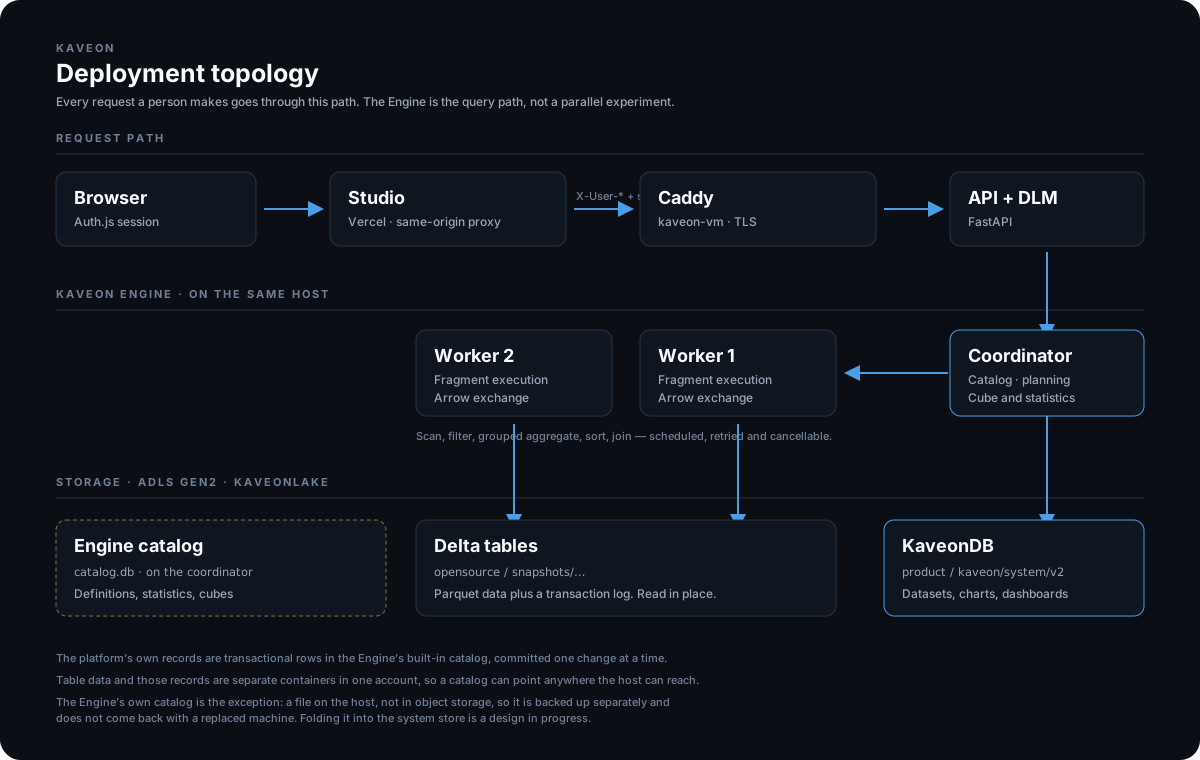
One request path: browser → Studio (Vercel, AKS, or VM) → its same-origin proxy → the API → the Kaveon Engine coordinator → its workers → object storage. The Engine is the query path for every chart, dashboard and question; nothing answers around it. Studio is the only front door, and the API trusts the proxy header, so the API and the Engine must never be published.
Health and readiness
curl -fsS https://<api-host>/api/health      # the API — note the /api prefix
curl -fsS http://<engine-host>/health        # liveness: the process answers
curl -fsS http://<engine-host>/ready         # readiness: it can serve
Liveness proves a process responds; readiness proves its dependencies — catalogs and the system store — are reachable. Monitor both separately, and alert on readiness rather than liveness: a coordinator that is up but cannot read its store will answer /health and fail every query.
A worker appearing healthy says nothing about whether the cluster returns correct answers for a given topology. Check the Engine console’s worker count against what you deployed before trusting a result.
Back up both places Kaveon keeps its memory
This is the part most easily got wrong, because only two of the three pieces of state are in object storage.
| What | Where | How to back it up |
|---|---|---|
| The platform’s records — datasets, charts, dashboards, saved statements, chat history, favourites, audit | The system store: the configured container and prefix, or a directory | The provider’s versioning and retention; a directory copy for a local store |
| The Engine’s catalog — catalogs, schemas, every table definition, planner statistics, cubes | /var/lib/kaveon/catalog.db on the coordinator | Copy it with the coordinator stopped, or sqlite3 catalog.db ".backup" while it runs |
| Table data | Wherever each catalog points | Backed up where it lives; Kaveon only reads it |
.backup. And verify a restore: a backup nobody has restored from is not yet a backup. A restore that brought the records back and left this catalog empty cost twenty-eight table registrations, rebuilt by hand.Replacing a host
Losing the machine is not losing the data. Table data and the system store are untouched when both are in object storage. What does not come back on its own is the Engine’s catalog, so a new host comes up able to read everything and knowing about nothing.
With catalog.db restored from backup, the stack comes up as it was. Without it, rebuild the map:
# 1. Bring the stack up against the same system store, so the dashboards,
#    charts and datasets are already there.
./scripts/kaveon-up.sh --storage adls://<account>/<container>/<prefix>

# 2. Re-register each catalog, its schemas and its tables. Columns are read
#    from each table's own metadata; re-running skips what already exists.
python scripts/register-lake-catalog.py --api http://localhost:8082 \
    --catalog OpenSource --account <account> --container <container> \
    --root snapshots/<version> \
    --schema public:<table>,<table>

# 3. Re-measure. ANALYZE each table, from SQL Lab or the Catalog page.
Expect step 3 to take a while, and expect dashboards to be right and slow until it finishes: a tile that was answered from a cube goes back to scanning its table until that table’s cube exists again. The cube pass gives each worker a single task over all of its files under a hard 600 second ceiling, so a large table may need more workers to fit inside it — bring them up to build, then take them down.
Routine checklist
- After every deploy, verify a Studio-to-API request and each sign-in provider’s callback.
- Test registered sources and a representative read-only query per source.
- Track query latency and error rate, DLM freshness, and context rebuild failures.
- Watch the system store’s size and the coordinator’s disk: cubes, statistics and the exchange spool all live on the host.
- Rotate provider secrets,
KAVEON_PROXY_SECRETand the Engine bridge and catalog tokens through managed secret storage. The proxy secret must change on both tiers together. - Keep a copy of the environment file. It holds the only record of which provider, which admins and which storage a deployment was given.
Troubleshooting order
- Identify the failing boundary: browser, Studio proxy, API, the Engine, the system store, or a registered source.
- Correlate the status code, request id, deployment revision and server logs — without recording credentials.
- Check configuration and network reachability before changing data or restarting anything.
- Reproduce with the smallest read-only request, and compare
/healthagainst/ready. - For a slow answer rather than a failed one, read the lane the Engine reported: a tile that used to come from a cube and now scans means its table’s statistics or cube are missing, not that the query is wrong.
STATUS.md is the capability ledger, SECURITY.md covers trust boundaries, and DEPLOYMENT.md carries the current topology. Deployment has the storage layout and the environment variables.